Discussion Activity
Introduction
The Discussion activity enables students to engage in collaborative conversations, share ideas, and respond to their classmates directly within the WISE platform.
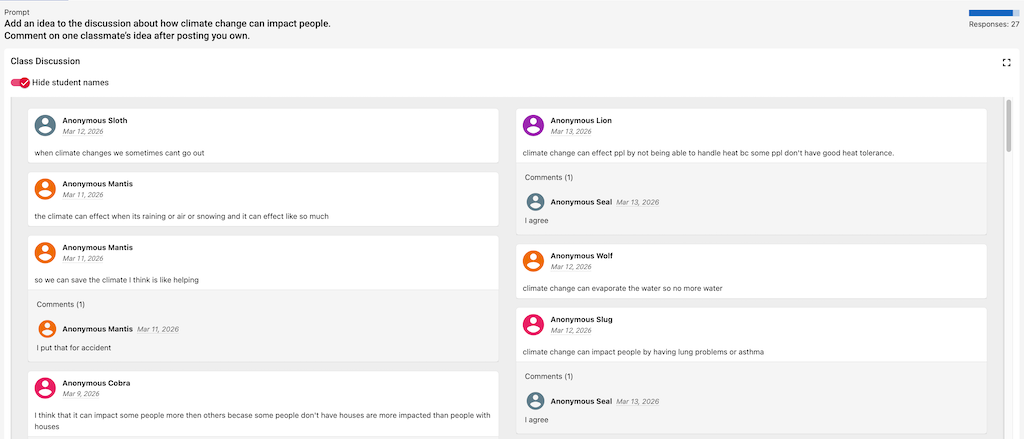 The teacher’s view of the student discussion activity.
Student Capabilities
- Upload and Use Images: Students can enrich their discussion posts by uploading and embedding images directly into their replies, making it easier to share diagrams, evidence, or visual examples.
- Gated Discussions: To encourage independent thinking, the activity can be gated. This requires students to create and submit their own post before they are allowed to view or reply to their classmates’ posts.
- Anonymized Posts: To foster a safe and low-stakes environment, student names can be anonymized so that they cannot see their classmates’ real names.
Teacher Tools
Teachers have full control and visibility over the Discussion activity via the Teacher Tools interface:
- Full Visibility: The teacher can view the entire discussion thread, including all student posts and replies.
- Moderation: Teachers can delete any inappropriate or off-topic comments to maintain a productive learning environment.
- Anonymous Projector Mode: Teachers can toggle an anonymous mode within the Teacher Tools. This is especially useful if they want to project the discussion board to the entire classroom without revealing which student authored a specific post.