Dynamic Activity
Introduction
Dynamic Activity allows authors to dynamically show specific activities (step content) to students based upon different conditions. Authors can display different content to different students within a single step.
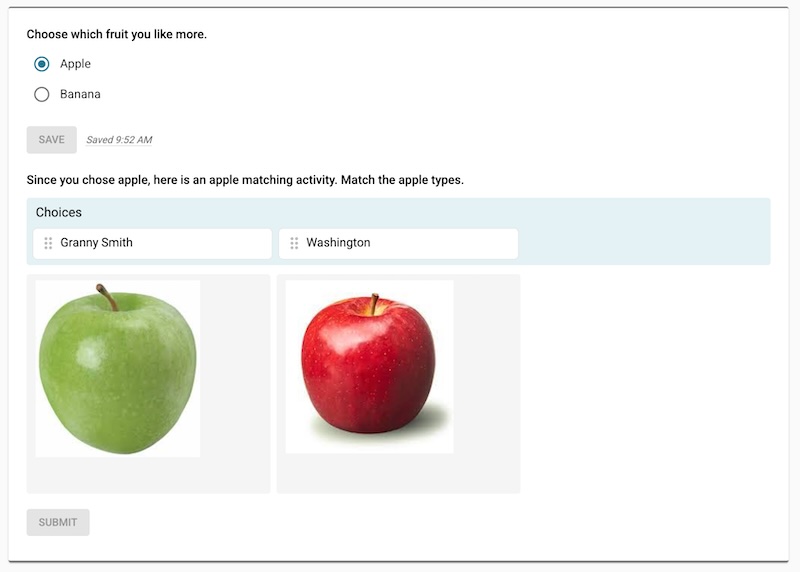 The dynamic activity feature. Choosing “Apple” caused the view to show a different activity than if the user had chosen “Banana”.
Dynamic Activities Based on Multiple Choice
Imagine a Multiple Choice activity that has two choices. If the student chooses the first choice, we can show them content related to the first choice. If the student chooses the second choice, we can show the student content related to the second choice.
You can play with a demo of this Multiple Choice scenario using the link below. If the student chooses “Apple”, we will then show them a Sorting activity related to apples. If the student chooses “Banana”, we will then show them a Sorting activity related to bananas.
Demo: Dynamic activities based on choice chosen
Dynamic Activities Based on Student Score
We can also dynamically show activities based on a score that the student receives.
You can play with a demo of this automated scoring scenario using the link below. If the student receives a score of 1, 2, or 3 on this question, we will show them a Table activity containing the speed of sound values and also another Open Response where they can answer the question again. If the student receives a score of 4 or 5, we will show them a Draw activity to let them have fun drawing a dolphin.